OpusClip review: is it the right tool for your videos?
OpusClip turns one long video into many short clips and posts them for you. It is built for people who already record long videos. Here is what the credits really buy, what customers report, and what to test before paying.

We make Ravenclip, which competes with OpusClip. This review uses OpusClip's own pages and public user reviews, linked throughout, so you can check every claim.
If you record podcasts, webinars, interviews or livestreams, most of that footage never reaches the people who scroll short-video feeds. OpusClip's pitch is simple: give it one long video and it finds the best moments, cuts them into vertical clips with captions, and posts them.
That is useful if you already make long videos. If you don't, it has nothing to work with, so the first question is whether you have the source material.
About this review: we make Ravenclip. This assessment uses OpusClip's public website, pricing page, help center and customer reviews, all checked on 25 September 2026. It is not a hands-on benchmark of clip quality or support.
The short verdict
OpusClip is a strong candidate if you regularly publish long videos and want short clips from them. Its homepage describes AI clipping, animated captions, reframing to vertical, B-roll, voice-over and posting to the main social platforms.
It is not a tool for making videos from nothing. Every clip starts from footage you supply, and pricing is based on how many minutes of that footage you process.
What the pricing page tells you
These are the prices on the pricing page on 25 September 2026, in US dollars.
| Plan | Price | Credits | Also included |
|---|---|---|---|
| Free | $0 | 60 a month | Watermark, no editing, clips exportable for 3 days |
| Starter | $15 a month (monthly only) | 150 a month | Watermark removed, 1 brand template, auto-posting |
| Pro | $29 a month, or $17.40 a month billed yearly ($208.80) | 300 a month per pack | 2 seats, 6 social accounts, scheduler, B-roll, top-ups |
| Business | Custom | Custom | API, dedicated support, security and contract terms |
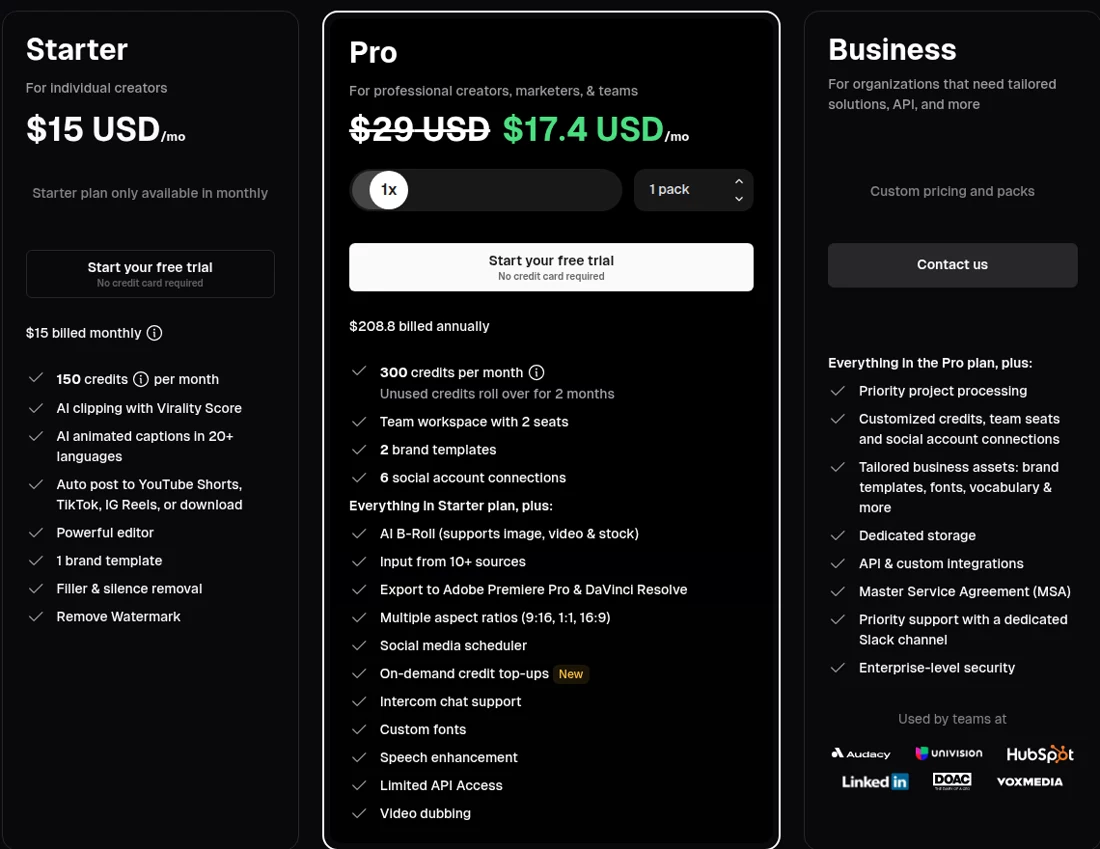
The help center explains what a credit buys: one credit per minute of the original video you import. A 30-minute podcast uses 30 credits, however many clips come out of it. You can process only part of a video to save credits. Posting to X costs one credit per post.
So the plans translate into source footage:
- Free: about one hour of video a month, with a watermark.
- Starter: about two and a half hours a month.
- Pro: about five hours a month per pack; you can buy more packs.
Two details matter for your budget. On monthly plans, credits expire after 60 days, so they roll over for one extra month. On yearly plans you get the whole year's credits up front and they expire after 12 months, whether you used them or not.
What customer reviews can tell you
On 25 September 2026, Trustpilot showed a TrustScore of 4 from 498 reviews, 434 of them from the last 12 months. The company had replied to all 79 negative reviews, usually within a day.
Recent positive reviews praise the value for money, regular new features and support that fixes problems quickly. The negative ones describe charges after cancelling, failed uploads, clips shorter than expected and unused yearly credits expiring.
That is a larger and more consistent record than many tools in this category. Still, use the complaints as a checklist for your own trial rather than a verdict.
Try one real video before subscribing
Use a real recording from your own channel, not a sample.
- Pick a typical video. Use your usual length and format, and note how many credits it uses.
- Review every clip. Check whether the chosen moments make sense on their own, whether the captions are correct and whether the framing follows the speaker.
- Count what you would post. How many of the clips are good enough without editing? How long do the rest take to fix?
- Test posting and exports. Connect the account you plan to use and check the export quality you need.
- Read the billing terms. Check renewal, how to cancel and when your credits expire. Keep a record of the cancellation.
Then divide the monthly price by the number of clips you would actually post. That is the figure to compare between tools.
OpusClip and Ravenclip: which workflow suits you?
The two tools start from different places. OpusClip starts from your long videos and cuts them into clips. Ravenclip starts from the news in your field: you choose a field, country and keywords, and it finds current stories, writes and voices the video, and posts on the days you choose. You don't record anything.

| Your main need | What to consider |
|---|---|
| Clips from podcasts, webinars or interviews you already record | Test OpusClip with a real episode |
| Regular short videos without recording anything | Explore Ravenclip's news workflow |
| Pay by the amount of footage you process | OpusClip's per-minute credits |
| A fixed number of finished videos each month | Ravenclip's monthly video allowance |
For Ravenclip's current plans, see pricing. For a side-by-side comparison, see Ravenclip vs OpusClip.
Is OpusClip worth it for you?
If you already publish long videos, OpusClip can turn hours of footage into a steady supply of clips, and its pricing is easy to predict once you know how many minutes you record. Judge it by how many of its clips you would post without editing.
If you don't record long videos, a clipping tool has little to work with. In that case, look at tools that create videos from a topic or from the news instead.
OpusClip questions
Is OpusClip free?
Yes, there is a free plan with 60 credits a month (about an hour of source video). Clips have a watermark, can't be edited and can only be exported for three days.
How much does OpusClip cost?
On 25 September 2026, Starter was $15 a month for 150 credits, and Pro was $29 a month, or $17.40 a month billed yearly, for 300 credits per pack. Business plans are priced on request.
What is an OpusClip credit?
One credit processes one minute of the original video you import. A 30-minute video uses 30 credits, however many clips it produces. Posting to X costs one credit per post.
Do OpusClip credits expire?
Yes. On monthly plans, credits expire after 60 days. On yearly plans, you receive the year's credits up front and they expire after 12 months.
Can OpusClip post automatically?
Yes. Every paid plan can post to YouTube Shorts, TikTok and Instagram Reels, and Pro adds a social media scheduler and up to six connected accounts.
When should I consider Ravenclip instead?
Consider it if you don't record long videos but want regular short videos on the news in your field. Ravenclip finds the stories and makes the videos, with a fixed number of videos a month.
Keep reading
- Faceless.video review: is it the right tool for your channel?
- YouTube Shorts not getting views? What we learned from 14 videos